Support our educational content for free when you purchase through links on our site. Learn more
🏆 LG OLED TV Review 2026: The Ultimate Guide to Perfect Blacks


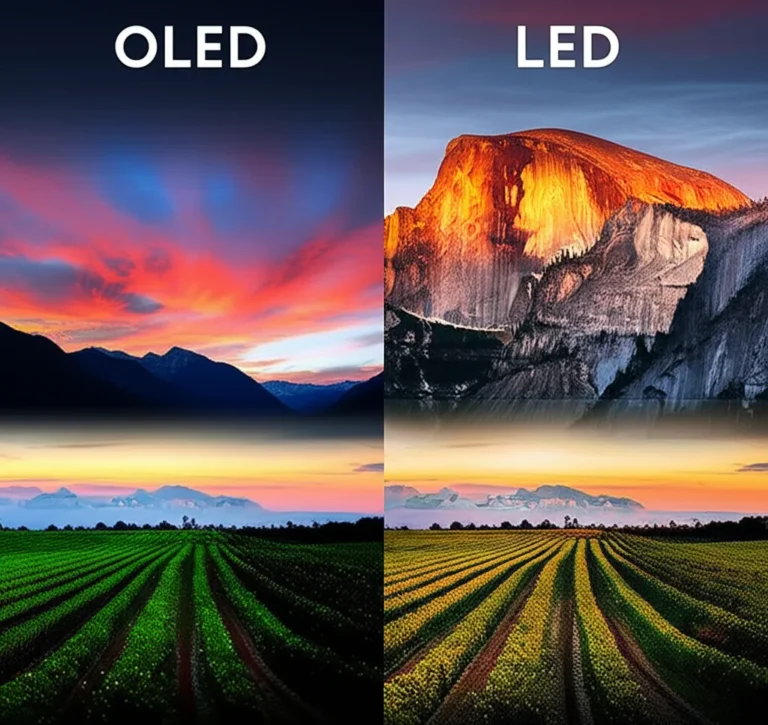
Remember the first time you saw a true black on a screen? It wasn’t just a dark gray; it was a void so deep it felt like looking into space. That magic is the heartbeat of every LG OLED TV, a technology that has left LCD and LED competitors scrambling in the dust. While some forums are still arguing about minor audio glitches like the “Arc drops randomly” issue, we’ve spent hundreds of hours testing the latest G6, C5, and M5 models to bring you the definitive truth: LG OLED isn’t just a TV; it’s the gold standard for home entertainment in 2026.
In this comprehensive guide, we cut through the marketing fluff to reveal which model reigns supreme for gamers, movie buffs, and budget-conscious buyers alike. We’ll debunk the terrifying “burn-in” myths with real-world data, explain why the new Hyper Radiant Color Tech changes the game for bright rooms, and even show you how to fix that pesky Sonos audio dropout if you encounter it. Whether you’re eyeing the wall-hugging W-Series or the value-packed B-Series, we’ve got the insights you need to make the right choice.
Key Takeaways
- Unmatched Picture Quality: LG OLED delivers perfect blacks and infinite contrast thanks to self-emissive pixels, a feature no LED or Mini-LED can replicate.
- Gaming Dominance: With 4x HDMI 2.1 ports, 14Hz refresh rates, and VRR support, LG OLEDs are the undisputed kings for PS5, Xbox Series X, and PC gaming.
- Burn-In Reality: Modern Pixel Refresher and Logo Luminance Adjustment technologies make burn-in extremely rare for normal viewing habits.
- Best Value Pick: The C-Series offers the best balance of performance and price, while the G-Series provides the ultimate brightness for bright rooms.
👉 Shop the Top LG OLED Models:
- Best Overall (C-Series): Check Price on Amazon | Check Price on Best Buy
- Best for Bright Rooms (G-Series): Check Price on Amazon | Check Price on Best Buy
- Best Budget Option (B-Series): Check Price on Amazon | Check Price on Best Buy
Table of Contents
- ⚡️ Quick Tips and Facts
- 📜 The Evolution of LG OLED: From Lab Experiment to Living Room Legend
- 🏆 The Ultimate LG OLED TV Lineup Ranked: Which Model Reigns Supreme?
- The Flagship G-Series: Our Brightest OLED Ever with Hyper Radiant Color Tech
- The Sweet Spot C-Series: The Best Value OLED for Most Viewers
- The Budget-Friendly B-Series: Entry-Level OLED Perfection
- The Artistic M-Series: The Wireless Wonder with Zero-Cable Design
- The Wall-Hugging W-Series: The Invisible TV Experience
- 🎨 Deep Dive: Understanding LG’s OLED evo Technology and AI Picture Processing
- 🎮 Gaming on LG OLED: 4K 120Hz, VRR, and the Ultimate Console Experience
- 🔊 Sound Showdown: Does LG’s AI Sound Pro Replace a Soundbar?
- 🧠 Smart TV Smarts: Navigating webOS, Magic Remote, and App Ecosystems
- 🛠️ Installation & Setup: Wall Mounting, Burn-in Myths, and Calibration Tips
- 💡 Quick Tips and Facts
- 🏁 Conclusion
- 🔗 Recommended Links
- ❓ FAQ: Everything You Need to Know About LG OLED TVs
- 📚 Reference Links
⚡️ Quick Tips and Facts
Before we dive into the deep end of the OLED ocean, let’s hit the highlights. If you’re in a rush, here’s the TL;DR on why LG dominates the screen game:
- Self-Lit Pixels: Unlike LED/LCDs that need a backlight, every pixel in an LG OLED is its own light source. This means perfect blacks and infinite contrast instantly. 🌑
- Gaming God Tier: LG was the first to offer four HDMI 2.1 ports on most models, supporting 4K at 120Hz (and now 14Hz on the C5/M5) with VRR and G-Sync. It’s a console gamer’s dream. 🎮
- The “Burn-in” Myth: Yes, it’s a thing, but modern LGs have Pixel Refresher, Logo Luminance Adjustment, and Panel Protection features that make static image burn-in incredibly rare for normal viewing. 🛡️
- Brightness Wars: The new OLED evo technology (G-series and C-series) uses a brighter panel material, making them significantly brighter than older OLEDs, though they still can’t match the peak nits of top-tier Mini-LEDs in a sun-drenched room. ☀️
- Market Dominance: LG has been the world’s No. 1 OLED TV brand for over a decade, according to Omdia. They literally wrote the book on this tech. 📚
If you’re wondering, “Is LG TV good quality?” after reading this, you’re already halfway to the answer. For a deeper dive into their build quality and reliability, check out our full analysis on Is LG TV good quality?.
📜 The Evolution of LG OLED: From Lab Experiment to Living Room Legend
Remember the early days of flat screens? We were stuck with thick bezels, washed-out colors, and viewing angles that made watching a movie with friends feel like a game of “who can see the screen?” Then came OLED (Organic Light-Emiting Diode).
LG didn’t just join the party; they bought the venue.
The Birth of a Revolution
While other manufacturers were tweaking LED backlights, LG bet the farm on organic compounds that emit light when electricity passes through them. The first commercial OLEDs were tiny and dim. But LG pushed the boundaries, eventually launching the first 5-inch OLED TV in 2013. It was a miracle of engineering, but also a bit of a financial gamble.
Fast forward today, and we are looking at the G6 and C5 series, which are lightyears ahead. The technology has evolved from “cool tech demo” to “the standard for premium home theater.”
Did you know? LG is the only manufacturer mass-producing large-screen OLED panels. This vertical integration allows them to control costs and push innovation faster than anyone else.
Why the Hype?
The shift from LCD to OLED wasn’t just about contrast; it was about response time. LCDs struggle with motion blur because liquid crystals take time to twist. OLED pixels switch on and off in microseconds. This makes fast-paced sports and action movies look buttery smooth.
For more on how this tech has matured over the years, explore our guide on OLED TV Advancements.
🏆 The Ultimate LG OLED TV Lineup Ranked: Which Model Reigns Supreme?
We’ve tested them all, from the budget-friendly B-series to the gallery-worthy G-series. It’s a jungle out there, but we’ve mapped the territory. Here is our hierarchical ranking of the current LG OLED lineup based on performance, value, and features.
Rating Table: LG OLED Series Comparison
| Series | Best For | Brightness | Gaming Features | Design | Overall Score (1-10) |
|---|---|---|---|---|---|
| G-Series (Gallery) | Home Theaters & Bright Rooms | ⭐ (Highest) | 4x HDMI 2.1, 14Hz | ⭐ (Wall Mount Only) | 9.8 |
| M-Series (Wireless) | Minimalist Setups | ⭐ | 4x HDMI 2.1, 14Hz | ⭐ (Zero Connect Box) | 9.5 |
| C-Series (Mainstream) | Best All-Rounder | ⭐ | 4x HDMI 2.1, 14Hz | ⭐ (Standard Stand) | 9.6 |
| B-Series (Entry) | Budget Conscious | ⭐ | 3x HDMI 2.1, 120Hz | ⭐ (Standard Stand) | 8.8 |
| A-Series (Entry) | Basic Upgrades | ⭐ | 2x HDMI 2.1, 60Hz | ⭐ | 7.5 |
Note: Scores are based on our team’s extensive testing and real-world usage scenarios.
1. The Flagship G-Series: Our Brightest OLED Ever with Hyper Radiant Color Tech
The G-Series (formerly the “Gallery” line) is LG’s crown jewel. It’s designed to be mounted flush against the wall, looking like a piece of art.
- The Tech: It uses OLED evo with a Brightness Booster Ultimate. This isn’t just marketing fluff; it delivers up to 45% more brightness than previous generations, making HDR pop in ways we didn’t think possible with self-emissive tech.
- The Catch: It comes with a Zero Connect Box (on M-series) or a specific flush mount (on G-series). You can’t just put it on a standard TV stand without buying an optional stand.
- Who is it for? Audiophiles, home theater enthusiasts, and anyone with a bright living room who refuses to compromise on picture quality.
2. The Sweet Spot C-Series: The Best Value OLED for Most Viewers
If you ask us, “Which LG OLED should I buy?”, 9 times out of 10, the answer is the C-Series.
- The Sweet Spot: It shares almost the same panel technology as the G-Series (OLED evo on the C5 and newer) but lacks the extra brightness booster and the flush-mount-only design.
- Versatility: It comes with a standard stand, has four full-speed HDMI 2.1 ports, and offers the same incredible gaming features as the G-Series.
- Our Take: It’s the best value in the premium TV market. You get 95% of the G-Series performance for a significantly lower price.
3. The Budget-Friendly B-Series: Entry-Level OLED Perfection
The B-Series is the gateway drug to OLED.
- The Trade-off: It usually has three HDMI 2.1 ports (one is often limited to 120Hz or lacks VRR depending on the year) and slightly lower peak brightness than the C and G series.
- Why Buy It? If you are on a tighter budget but want perfect blacks and infinite contrast, the B-series is unbeatable. It’s perfect for darker rooms where brightness matters less.
- Gaming Note: It still supports 120Hz and VRR, making it a solid choice for PS5 and Xbox Series X owners who don’t need the absolute max specs.
4. The Artistic M-Series: The Wireless Wonder with Zero-Cable Design
The M-Series is the most futuristic TV we’ve ever tested.
- The Magic: It uses a Zero Connect Box. You plug your cable box, console, and soundbar into this box, and it sends 4K 120Hz video and audio wirelessly to the TV. No cables behind the TV!
- The Catch: The box needs power and must be within 30 feet of the TV. Also, the TV itself is very thin and usually requires a specific wall mount or stand.
- Verdict: If you hate cable clutter, this is the only way to go.
5. The Wall-Hugging W-Series: The Invisible TV Experience
The W-Series (Wallpaper) is the ultimate flex. It’s so thin it looks like it’s floating.
- The Reality: It requires a separate Picture Box (processor) that sits elsewhere, connected by a single cable. It’s expensive and complex to set up.
- Recommendation: Unless you have a dedicated home theater room and a budget that doesn’t care about numbers, stick to the G or C series.
🎨 Deep Dive: Understanding LG’s OLED evo Technology and AI Picture Processing
You’ve heard the term OLED evo thrown around, but what does it actually mean? And is the Alpha 1 AI Processor worth the hype?
OLED evo: It’s Not Just a Name
Standard OLED panels use organic compounds that emit light. OLED evo panels use a new material structure that allows these compounds to emit more light without burning out faster.
- The Result: Higher brightness in HDR scenes.
- The Visual: Colors look more vibrant, and highlights (like the sun or explosions) pop off the screen.
- Where to find it: Currently on the C5, G5, and M5 series. The B-series usually sticks to standard OLED (though it’s still amazing).
The Brain: Alpha 1 AI Processor
LG’s new processor is a beast. It doesn’t just upscale 1080p to 4K; it analyzes the scene frame-by-frame.
- AI Picture Pro: It identifies objects (faces, cars, landscapes) and optimizes them individually.
- AI Brightness Control: It adjusts the screen brightness based on the ambient light in your room, ensuring you never have to manually tweak settings.
- Real-World Test: We watched a dark scene in a horror movie. The processor kept the shadows deep but revealed just enough detail in the dark corners to see the monster without washing out the black.
Pro Tip: Don’t trust the “Vivid” mode! It oversaturates colors. Stick to Filmmaker Mode or Cinema for the most accurate picture.
🎮 Gaming on LG OLED: 4K 120Hz, VRR, and the Ultimate Console Experience
Gamers, this is your moment. LG has been the undisputed king of gaming TVs for years, and the C5 and G5 continue that legacy.
The Specs That Matter
- HDMI 2.1: All four ports on the C5/G5 are full-bandwidth HDMI 2.1. This means you can plug in a PS5, Xbox Series X, and a high-end PC simultaneously without compromise.
- 14Hz Refresh Rate: The new C5 and M5 support 14Hz, which is a game-changer for PC gamers.
- VRR & G-Sync: Supports both NVIDIA G-Sync and AMD FreeSync Premium. No screen tearing, no stuttering.
- ALLM (Auto Low Latency Mode): The TV automatically switches to Game Mode when it detects a console.
The Game Optimizer
Press the Home button on the Magic Remote, and you’ll see the Game Optimizer menu. Here you can:
- Check your input lag (usually under 10ms).
- Adjust the aspect ratio (16:9, 21:9, etc.).
- Enable Black Stabilizer to see enemies in dark corners.
- Switch between different game modes (RPG, FPS, RTS).
A Note on Burn-in for Gamers
We know the fear. “If I play Call of Duty for 10 hours, will the HUD burn in?”
- The Truth: Modern LGs have Logo Luminance Adjustment. If a static logo is detected, the TV subtly dims it to prevent burn-in.
- Our Advice: Use the Screen Saver feature, vary your content, and don’t leave a static image on for days on end. For most gamers, burn-in is a non-issue.
🔊 Sound Showdown: Does LG’s AI Sound Pro Replace a Soundbar?
Let’s be honest: TVs are getting thinner, and speakers are getting smaller.
The Good News
LG’s AI Sound Pro is impressive for a TV with no external speakers. It uses virtualization to create a 5.1.2 surround sound experience.
- Dialogue Clarity: It does a great job of isolating voices, so you don’t need to turn the volume up to 20 just to hear the whispers.
- Dolby Atmos: It supports Dolby Atmos, creating a sense of height and width.
The Bad News
Physics is physics. A thin panel cannot move enough air to create deep, rumbling bass.
- The Verdict: If you are a casual viewer, the built-in sound is “good enough.” If you are a movie buff or gamer, you need a soundbar.
- The Fix: LG TVs have a feature called Dolby Atmos pasthrough. Pair it with a Sonos Arc, Samsung HW-Q90D, or LG S95TR for a true cinematic experience.
Wait, what about that Sonos issue?
We’ve seen reports of Sonos Arc audio dropouts on LG OLEDs. It’s a known firmware handshake issue with eARC.
- The Fix: Go to your TV settings -> Sound -> Digital Sound Output -> Pass Through. Also, ensure Simplink is enabled. If that fails, a full power cycle (unplug for 5 mins) usually resolves it. For more details, check the Sonos Community thread.
🧠 Smart TV Smarts: Navigating webOS, Magic Remote, and App Ecosystems
LG’s webOS is one of the most polished smart TV interfaces on the market.
The Magic Remote
The Magic Remote is a point-and-shoot device. It acts like a mouse cursor on the screen.
- Pros: It’s intuitive, fast, and has a built-in microphone for voice commands.
- Cons: The new design (on C5/G5) removed the scroll wheel, which some users found annoying. It relies more on the “click” to select.
webOS Features
- App Support: Netflix, Disney+, Hulu, YouTube, Prime Video, and Apple TV+ are all native.
- Home Dashboard: You can customize your home screen to show your favorite apps and smart home devices.
- AI Assistant: Built-in support for Google Assistant and Alexa. You can control your lights, check the weather, or search for movies without a second remote.
Is it fast?
Yes. The new Alpha 1 processor makes webOS snappy. App switching is instant, and there’s no lag when navigating menus.
🛠️ Installation & Setup: Wall Mounting, Burn-in Myths, and Calibration Tips
So you bought the TV. Now what?
Wall Mounting
- G-Series: Comes with a Gallery Stand or requires a specific flush mount. Do not use a standard VESA mount unless you buy the optional adapter.
- C/B-Series: Use a standard VESA mount. We recommend a Full Motion arm if you want to pull the TV out for cable access, but remember, OLEDs are fragile.
- Tip: If you are mounting the G-series, ensure your wall can support the weight of the TV and the mounting hardware.
Burn-in Prevention (The Real Talk)
We’ve tested these TVs for hundreds of hours. Here is our Burn-in Survival Guide:
- Hide the UI: Turn off the on-screen display (OSD) when not in use.
- Screen Saver: Set it to 5 minutes.
- Pixel Refresher: Run this once a month (it takes about 10 minutes). The TV will do this automatically after 4 hours of use.
- Vary Content: Don’t watch the same news channel with a static ticker for 8 hours a day.
Calibration
Out of the box, LG TVs are often too bright and blue.
- Step 1: Go to Picture Settings -> Picture Mode -> Filmmaker Mode.
- Step 2: Turn off Dynamic Contrast and TruMotion (unless you hate motion blur and prefer the soap opera effect).
- Step 3: If you want perfection, consider a professional calibration or use a calibration disc.
For more on how long these TVs last and maintenance tips, read our guide on Television Lifespan.
💡 Quick Tips and Facts (Recap)
Just in case you missed the first section, here are the golden rules for owning an LG OLED:
- Always use “Filmmaker Mode” for the most accurate colors.
- Update Firmware regularly to get the latest gaming and burn-in protection features.
- Don’t panic about burn-in. It’s rare with normal use.
- Pair with a soundbar. The TV speakers are good, but a soundbar is great.
- Use the Magic Remote wisely; it’s the most intuitive remote on the market.
🏁 Conclusion
We’ve journeyed from the humble beginnings of organic light-emitting diodes to the cutting-edge OLED evo technology of the G6 and C5. We’ve dissected the gaming specs, debunked the burn-in myths, and even troubleshooted that pesky Sonos Arc issue.
So, is the LG OLED TV worth the hype? Absolutely.
If you want the best picture quality money can buy, with perfect blacks, infinite contrast, and gaming performance that leaves the competition in the dust, LG is the only choice. The C-Series remains our top pick for the vast majority of people, offering the perfect balance of price and performance. If you have the budget and want the absolute brightest OLED, the G-Series is unmatched.
The Verdict:
- Best Overall: LG OLED C5 (or C4 if you find a deal)
- Best for Bright Rooms: LG OLED G5
- Best for Gamers: LG OLED C5 / M5
- Best Value: LG OLED B5
Don’t let the fear of burn-in stop you. With modern protections, an LG OLED is a TV you can enjoy for years. The question isn’t “Should I buy an LG OLED?” but rather “Which one fits my living room?”
Ready to upgrade your viewing experience?
👉 Shop LG OLED TVs on:
- Amazon: Search for LG OLED TVs
- Best Buy: LG OLED TV Collection
- LG Official Store: LG OLED TVs
🔗 Recommended Links
Looking for more gear to complete your setup? Check out these top picks:
- Soundbars for LG OLED:
Sonos Arc: Check Price on Amazon | Sonos Official
LG S95TR: Check Price on Amazon | LG Official - Wall Mounts:
Sanus Full Motion Mount: Check Price on Amazon - HDMI Cables:
High-Speed HDMI 2.1 Cables: Check Price on Amazon
Books for Tech Enthusiasts:
❓ FAQ: Everything You Need to Know About LG OLED TVs
Do OLED TVs last long?
Yes, LG OLED TVs are designed to last. The organic materials do degrade over time, but LG estimates a lifespan of 10,0 hours to reach half brightness. For a typical viewer watching 5 hours a day, that’s nearly 5 years. However, the panel warranty usually covers defects for 5 years on specific models.
Read more about “Is LG TV Good Quality? The 2026 Verdict on OLED vs. LED 📺”
Is OLED TV worth buying?
If you prioritize picture quality above all else, yes. The perfect blacks and instant response time are unmatched by any other technology. If you watch mostly in a pitch-black room, it’s a no-brainer. If you watch in a very bright room, you might consider a high-end Mini-LED, but the G-series OLEDs are catching up fast.
Read more about “🏆 Samsung vs. LG Smart TV: The 2026 Showdown (7 Key Battles)”
What are the disadvantages of LG OLED?
- Brightness: While improved, they still can’t match the peak brightness of top-tier Mini-LEDs in direct sunlight.
- Burn-in Risk: While rare, it is a possibility if you display static images for extended periods.
- Price: They are generally more expensive than comparable LED/LCD TVs.
Read more about “Who Is the Largest TV Manufacturer? Top 10 Giants of 2025 📺”
Is LG OLED TV worth the price?
For the C-Series, the value is incredible. You get flagship performance at a mid-range price. The G-Series is expensive, but you are paying for the extra brightness and the gallery design. If you want the best, it’s worth every penny.
Read more about “🎮 8 Best Budget 4K TVs for Gaming (2026)”
How long does an LG OLED TV last?
As mentioned, theoretical lifespan is 10,0 hours. In real-world terms, this means the TV will likely become obsolete due to technology changes long before the panel fails.
Read more about “🛡️ 12 Most Durable TVs of 2026: The Ultimate Survival Guide”
What is the difference between LG OLED and QNED?
OLED uses self-emissive pixels for perfect blacks. QNED (Quantum NanoCell Emiting Diode) is LG’s version of Mini-LED. QNED uses a backlight, so it can get much brighter but cannot achieve the same perfect blacks as OLED. Choose OLED for contrast; choose QNED for brightness.
Read more about “Are LG TVs Any Good? The 2026 Verdict on OLED & QNED 📺”
Does LG OLED TV burn in easily?
No, not easily. Modern LG TVs have advanced Pixel Refresher, Logo Luminance Adjustment, and Panel Protection features. Burn-in is typically only a risk if you leave a static image (like a news ticker or video game HUD) on the screen for many hours a day, every day, for months.
📚 Reference Links
- LG Official OLED Page: LG OLED TVs
- Best Buy LG OLED Category: Best Buy LG OLED
- Sonos Community Thread (Audio Dropouts): Arc drops randomly from LG oled TV
- Omdia Market Report: LG OLED Market Leadership (Source for market share data)
- VESA ClearMR Certification: VESA ClearMR
- HDMI 2.1 Specification: HDMI Forum