Support our educational content for free when you purchase through links on our site. Learn more
OLED vs. QLED TVs: What’s the Real Difference? 🔍

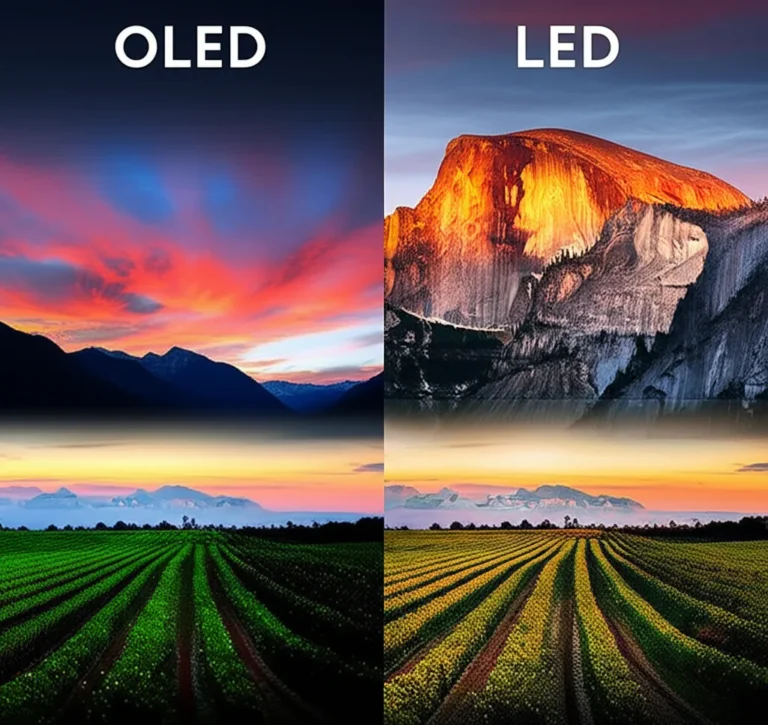
OLED is usually the better pick for deep blacks and movie nights; QLED is often better for bright rooms and vivid daytime viewing. So, what is the difference between OLED and QLED TV brands? The key difference is the screen technology, not the logo: OLED pixels emit their own light, while QLED TVs use an LED backlight, an LCD panel, and quantum dots to produce color.
That distinction shows up when the room goes dark. In our viewing comparisons, a stary sky or bright subtitle against black makes OLED’s pixel-by-pixel light control easy to appreciate. But put the TV in a sunny living room, and a bright Mini-LED QLED may have the upper hand.
One wrinkle: Samsung, LG, Sony, TCL, and Hisense all sell different kinds of TVs, and a brand name alone doesn’t guarantee picture quality. The right model depends on your room, viewing habits, gaming needs, and tolerance for OLED burn-in risk.
Key Takeaways
- OLED creates light pixel by pixel, delivering excellent black levels and contrast.
- QLED is an LCD TV enhanced with quantum dots; bright QLED and Mini-LED models can suit sunny rooms.
- OLED is a strong choice for dark-room movies and gaming; QLED is worth considering for bright rooms, static content, or very large screens.
- QLED isn’t one uniform quality tier: compare the exact model’s brightness, local diming, viewing angles, and gaming features.
- UHD means resolution, not display technology. A TV can be 4K UHD and OLED, QLED, or standard LED-LCD.
Table of Contents
- ⚡️ Quick Tips and Facts: OLED vs. QLED at a Glance
- 🧭 OLED and QLED TV Background: How These Technologies Evolved
- 🔍 What OLED and QLED Actually Mean
- What Is an OLED TV?
- What Is a QLED TV?
- How LED and LCD TVs Fit Into the Picture
- What Is Mini-LED, and Where Does Neo QLED Fit?
- ⚔️ OLED vs. QLED: The Key Differences Explained
- Picture Quality, Contrast, and Black Levels
- Brightness, HDR, and Color Volume
- Viewing Angles and Screen Uniformity
- Motion Handling and Gaming Performance
- Lifespan, Burn-In, and Reliability
- Energy Use, Reflections, and Room Conditions
- 🏠 Which TV Technology Is Best for Your Room and Viewing Habits?
- Best TV for Bright Rooms and Daytime Viewing
- Best TV for Dark Rooms and Movie Nights
- Best TV for Sports, Streaming, and Cable
- Best TV for PS5, Xbox, and PC Gaming
- Best TV for Families and Always-On Content
- 🏷️ OLED and QLED TV Brands Compared
- Samsung QLED, Neo QLED, and OLED TVs
- LG OLED and QNED TVs
- Sony OLED and QLED-Style Mini-LED TVs
- TCL and Hisense QLED and Mini-LED TVs
- How TV Brand Names and Marketing Terms Can Mislead
- 🛒 How to Choose the Right OLED or QLED TV
- Screen Size, Resolution, and Viewing Distance
- Refresh Rates, HDMI 2.1, and Gaming Features
- HDR Formats, Smart TV Systems, and Audio
- What to Check in Reviews and Store Demonstrations
- ✅ OLED vs. QLED: Quick Buying Recommendations
- 💡 OLED and QLED TV Care, Setup, and Picture-Quality Tips
- 🔗 Recommended Links
- ❓ FAQ
- Is OLED better than QLED?
- Is QLED the same as LED or OLED?
- Can OLED TVs suffer burn-in?
- Are QLED TVs better in bright rooms?
- Which lasts longer, OLED or QLED?
- Is Neo QLED better than OLED?
- Which TV technology is best for gaming and sports?
- 📚 Reference Links
- 🏁 Conclusion
⚡️ Quick Tips and Facts: OLED vs. QLED at a Glance
For more TV buying guides and brand comparisons, start with TV Brands™. Our reviewers’ short version: OLED wins for pixel-level contrast and dark-room movie viewing; QLED often wins for sustained brightness, broad size choices, and bright rooms. The right answer still depends on the specific TV—not just the badge on the bezel.
| What matters most? | Usually the stronger fit | Why |
|---|---|---|
| Deep blacks and dramatic contrast | OLED | Each pixel can switch off independently. |
| A very bright room | Bright QLED or Neo QLED | LED backlights can drive high full-screen brightness. |
| Wide seating arrangement | OLED | OLED generally preserves picture quality better from off-center seats. |
| Lower burn-in concern for static content | QLED | LCD-based QLED displays are not subject to OLED-style pixel burn-in. |
| Very large screen choice | QLED | LCD-based ranges commonly span more sizes. |
| Dark-room gaming and fast pixel response | OLED | Near-instant pixel response and pixel-level diming make motion and contrast pop. |
| Lower-cost big-screen shopping | QLED | There are many LCD-based choices across screen sizes and feature tiers. |
Fast facts:
- OLED and QLED are display technologies, not TV brands.
- QLED is an LCD TV with a quantum-dot layer and an LED backlight. OLED pixels generate their own light.
- Mini-LED is a type of LCD backlight, not a separate panel technology. Samsung sells Mini-LED models under the Neo QLED name.
- UHD means resolution, usually 4K UHD. It does not tell you whether a TV is OLED, QLED, or standard LED-LCD.
- A budget QLED isn’t automatically better than a premium LED-LCD, and a premium QLED isn’t automatically better than an OLED. Model quality, diming, processing, and setup matter.
Samsung’s TV technology guide makes the central distinction clear: OLED is self-emissive, while QLED adds quantum dots to an LED-backlit LCD design. We agree with the basic explanation, but brand buying guides naturally emphasize their own lineups. For neutral comparisons, look at independent tests from outlets such as RTINGS and CNET.
🧭 OLED and QLED TV Background: How These Technologies Evolved
The names sound like distant cousins. They’re not. OLED and QLED solve the same problem—how to make a good-looking picture—in fundamentally different ways.
LCD TVs became popular because they could make thin, large screens without the bulky designs of older CRT sets. LCD pixels don’t produce light themselves, so LCD TVs need a backlight. That backlight was once fluorescent; modern sets use LEDs. Quantum-dot films later helped LCD televisions produce brighter, richer color, giving rise to the QLED label.
OLED took a different route. Its pixels emit light directly, removing the need for a separate backlight. That lets each pixel dim or turn off on its own, which is why dark scenes can look so convincing.
The product landscape keeps changing:
- LG helped popularize large OLED TVs using panels made by LG Display.
- Samsung sells both quantum-dot LCD TVs and OLED TVs, including QD-OLED models.
- Sony sells OLED TVs and LCD-based Mini-LED models.
- TCL and Hisense offer a wide range of QLED and Mini-LED LCD TVs.
- Newer backlight designs, including Mini-LED, have narrowed some contrast and brightness gaps without changing the basic LCD architecture.
Panel supply and specific model technology can vary by region and year. A brand name alone won’t tell you precisely what panel is inside; check the model specifications and independent testing.
🔍 What OLED and QLED Actually Mean
What Is an OLED TV?
OLED stands for organic light-emitting diode. In an OLED television, each pixel produces its own light. When a pixel needs to show black, it can switch off.
That pixel-level control brings three practical benefits:
- Deep blacks: dark parts of the image can be nearly black without a backlight glowing behind them.
- Precise contrast: a bright star can sit beside a dark sky without creating a broad halo.
- Wide viewing angles: picture quality tends to remain consistent when you sit away from the center.
OLED’s pixel-level diming is also why movie subtitles on a black background often look especially crisp. In our viewing tests, the difference is easiest to spot in a dim room: a night sky, a letterboxed film, or a candlelit scene immediately reveals whether dark areas are truly dark.
OLED isn’t flawless. A very bright room can reduce its perceived punch, and static images displayed at high brightness for long periods can increase the risk of uneven pixel wear. Manufacturers use screen savers, pixel-shifting, and other protective features, but good habits still help. See LG’s OLED TV information and the OLED TV advancements category for more on the technology.
What Is a QLED TV?
QLED means quantum-dot LED in common TV marketing. A QLED is still an LCD TV: it uses a backlight, an LCD layer to control the image, and a quantum-dot layer to improve color.
The quantum dots help convert backlight energy into more precise colors. Depending on the model, a QLED TV can offer:
- High brightness, useful for daytime viewing and HDR highlights.
- Vivid color, particularly at higher brightness levels.
- A wide choice of screen sizes and models.
- Less concern about permanent image retention than with OLED.
But “QLED” does not guarantee a premium picture. A basic edge-lit QLED may have weaker black levels and less precise diming than a high-end Mini-LED model. The label tells you about the quantum-dot layer, not the quality of the backlight, processor, panel, or local diming.
Samsung uses QLED as a prominent product family, while TCL and Hisense also sell QLED-branded TVs. For model-specific details, compare the manufacturers’ specs with independent testing rather than treating all QLED sets as equivalent.
How LED and LCD TVs Fit Into the Picture
LED TV is the everyday name for an LCD TV with an LED backlight. The LED lights illuminate the screen; the LCD layer controls how much light passes through each pixel area.
That means:
- LED-LCD: LCD screen plus LED backlight.
- QLED: LED-LCD with a quantum-dot color layer.
- OLED: self-emissive pixels, no separate LCD backlight.
- UHD: a resolution category, commonly 3,840 × 2,160 pixels for 4K UHD.
A common shopping mix-up is comparing “OLED” with “4K.” They’re not alternatives. You can buy a 4K OLED, a 4K QLED, or a 4K standard LED-LCD TV. Resolution tells you how many pixels the image has; display technology tells you how those pixels are lit and controlled.
What Is Mini-LED, and Where Does Neo QLED Fit?
Mini-LED refers to smaller LEDs used in an LCD TV’s backlight. Because a set can fit more, smaller light sources behind the screen, it can create more local diming zones than many conventional LED designs. More zones can improve contrast and control light around bright objects.
Samsung Neo QLED is Samsung’s name for its quantum-dot LCD TVs with Mini-LED backlighting. Other brands use Mini-LED under different names, including TCL and Hisense. The underlying idea is similar, but implementation varies by model.
Mini-LED can make an LCD TV brighter and improve dark-scene performance. It still doesn’t turn each pixel off independently, so bright objects against black can produce some haloing, known as blooming. The number of diming zones, algorithms, panel type, and processing all affect how visible it is.
Don’t confuse Mini-LED with MicroLED. Mini-LED is a backlight technology for LCD TVs. MicroLED is a separate self-emissive display technology.
⚔️ OLED vs. QLED: The Key Differences Explained
| Feature | OLED | QLED |
|---|---|---|
| How the picture is lit | Each pixel emits its own light | LED backlight shines through an LCD panel; quantum dots enhance color |
| Black level | Pixels can turn off individually | Depends on backlight and local diming |
| Peak brightness | Strong, varies by panel and model | Premium models can reach very high brightness |
| Viewing angles | Generally wide | Varies; some LCD panels lose contrast or color off-center |
| Burn-in risk | Possible with prolonged static content | Not subject to OLED-style burn-in |
| Sizes and selection | Broad, but fewer giant-size options in many lineups | Often more choices, particularly at very large sizes |
| Best-known strength | Contrast and black detail | Brightness and colorful performance |
| Main drawback | Static-image care and bright-room limitations | Blooming and inconsistent black levels, depending on model |
CNET’s comparison summarizes the common consensus: OLED is especially strong for black levels and contrast; the brightest LCD-based QLED TVs can better suit sunny rooms. Their conclusion isn’t a universal rule for every model, though. The TV’s price tier, backlight design, screen coating, and room lighting can change the result.
Picture Quality, Contrast, and Black Levels
For a dark-room film, OLED has the clearest technology advantage. If a scene cuts from a white star to a black sky, the OLED can light only the star’s pixels. An LCD-based QLED must manage a backlight behind the screen, which can illuminate nearby dark areas.
A full-array local-dimming or Mini-LED QLED can reduce this effect substantially. But it dims groups of pixels, not every pixel independently. The trade-off is most visible in:
- Subtitles over black backgrounds.
- Star fields and space scenes.
- Bright menus over dark video.
- Small highlights in otherwise dark scenes.
The picture-quality comparison also depends on processing, calibration, and content. A poorly set-up OLED can look too dim or oversaturated; a capable Mini-LED QLED can deliver a terrific HDR picture in a bright living room. We’ve seen shoppers fixate on the technology badge and overlook the practical culprit: retail demo mode, which often cranks sharpness, color, and brightness far beyond a sensible home setting.
Brightness, HDR, and Color Volume
QLED’s backlight design gives premium LCD models an advantage in sustained brightness, especially across large bright areas. That can help when sunlight enters the room or when you watch daytime sports with the lights on.
OLED can still produce striking HDR highlights, and its contrast makes those highlights stand out against black. But the maximum brightness varies by model, scene size, and duration. OLED TVs may also reduce brightness in certain situations to manage heat and panel protection.
HDR performance isn’t just a brightness contest. Consider:
- Peak brightness: How bright small highlights get.
- Full-screen brightness: How bright large bright scenes remain.
- Tone mapping: How the TV handles content brighter than the display can reproduce.
- Color volume: Whether colors stay rich as brightness rises.
- Reflection handling: Whether the screen coating helps in a sunlit room.
Samsung describes its QLED sets as offering 100% Color Volume. That is a manufacturer claim tied to testing conditions, not a guarantee that every Samsung QLED will look better than every OLED. Compare independent measurements and real viewing impressions for the specific model.
Viewing Angles and Screen Uniformity
OLED is usually the safer choice for a wide sofa, dining area, or family room where people watch from different positions. LCD viewing angles vary considerably: some panels look excellent from the center but lose contrast or color when viewed from the side.
Screen uniformity is another model-level issue. OLED often handles dark scenes evenly, while LCD TVs can show clouding, banding, or uneven backlighting. Conversely, OLED panels can exhibit subtle near-black or gray uniformity variations. No display technology guarantees a perfectly uniform sample.
If possible, watch a neutral gray test image or a slow sports pan in a store. Don’t judge only from a colorful demo loop; it’s designed to flatter almost anything.
Motion Handling and Gaming Performance
OLED pixels can change state extremely quickly, making fast motion look crisp and reducing blur. That’s useful for gaming, action films, and sports—but it can also make low-frame-rate content look judery if motion settings aren’t tuned.
Many OLED and QLED models now offer:
- 4K resolution at high refresh rates.
- Variable refresh rate (VR).
- Auto Low Latency Mode (ALLM).
- HDMI 2.1 features on selected ports.
- Dedicated game dashboards and low-latency modes.
Don’t assume the panel type tells you whether a TV has the gaming connections you need. Check the exact model’s HDMI port count, supported refresh rates, VR format, and input lag. For reliable standards background, see the HDMI organization’s overview.
For console gaming, OLED is compelling if you play varied games and want contrast and responsiveness. If you leave the same HUD, sports ticker, or PC desktop on-screen for long sessions every day, an LCD-based QLED may be the lower-worry option.
Lifespan, Burn-In, and Reliability
OLED burn-in is possible, but it should be understood in context. Long-term, repeated display of bright, static elements can cause uneven pixel wear. Examples include a persistent news logo, a fixed game HUD, or a computer taskbar left onscreen for many hours.
Normal varied viewing is less concerning. Modern OLEDs include protective measures such as pixel shifting and screen refresh routines. CNET describes burn-in as a concern that “shouldn’t be a problem for most people” who vary their viewing, while warning against hours of repeated static content.
LCD-based QLED TVs don’t face OLED-style pixel burn-in, but they can still develop other faults over time, including backlight failures or panel defects. Neither technology makes a TV immune to problems.
Practical advice:
- Use the TV’s screen-saver and pixel-care features.
- Avoid leaving a paused image or static channel banner onscreen for hours.
- Don’t unplug an OLED immediately after use if it needs to run its maintenance cycle.
- Keep ventilation clear and follow the manufacturer’s care instructions.
- Check the warranty for how it handles image retention; coverage differs by model and region.
For OLED-specific care guidance, consult the relevant LG support resources or Samsung support.
Energy Use, Reflections, and Room Conditions
Power consumption depends on screen size, brightness, content, and settings. A bright scene can demand different power from a dark scene on OLED; an LCD backlight may use more power when set to high brightness. There’s no dependable one-word answer for which technology always uses less energy. Check the exact model’s energy label and official product specification.
Room conditions can matter more than a small spec-sheet difference:
- Sunny room: prioritize strong brightness and reflection handling.
- Dark room: prioritize black levels, contrast, and shadow detail.
- Wide seating: look closely at viewing-angle performance.
- Large windows opposite the TV: check glare in person, if possible.
- Always-on news or games: weigh burn-in risk and viewing habits.
That’s why two reviewers can disagree honestly: one may test in a dark, calibrated room; another may judge a bright family room at noon. They may be answering different questions.
🏠 Which TV Technology Is Best for Your Room and Viewing Habits?
Best TV for Bright Rooms and Daytime Viewing
Look first at bright Mini-LED QLED models from brands such as Samsung, TCL, or Hisense. A strong LCD backlight can keep the image vivid in daylight. But check reflections, because peak brightness alone won’t make glare disappear.
If you’re comparing models, look for independent measurements of peak and full-screen brightness, plus a review of the anti-reflective screen. Samsung’s Neo QLED range is one option; TCL and Hisense also sell Mini-LED sets, with model performance varying by year and series.
Best TV for Dark Rooms and Movie Nights
OLED is our default recommendation for a dedicated movie room or evening viewing. Its pixel-level diming delivers rich blacks and avoids much of the blooming that can appear around subtitles or bright objects on LCD models.
LG OLED, Samsung OLED, and Sony OLED TVs each have different processing, features, and picture modes. Don’t choose based on brand alone. Compare independent measurements and how each model handles near-black detail, motion, and HDR.
Best TV for Sports, Streaming, and Cable
Sports are a surprisingly tricky test. A bright QLED can punch through daylight and show vivid stadium scenes, while OLED can provide crisp motion and wide-angle viewing for a crowded room.
For cable and streaming, also check upscaling and processing. A TV has to make lower-resolution broadcasts look good on a 4K screen. Sony is often praised for processing, but performance is model-specific, and LG, Samsung, TCL, and Hisense all offer capable sets across different tiers.
Our store-floor anecdote: a TV that looks dazzling on a pristine 4K demo may make compressed cable sports look rough. Ask the salesperson to switch to a regular broadcast or streaming feed before you decide.
Best TV for PS5, Xbox, and PC Gaming
For cinematic gaming, OLED is hard to beat for contrast, response, and dark-scene detail. For a bright room or long sessions with fixed interface elements, a good Mini-LED QLED may be the more comfortable fit.
Before buying, verify:
- How many HDMI 2.1-capable inputs the TV has.
- Whether it supports your console’s desired refresh rate.
- Which VR formats it supports.
- Whether game mode keeps the features you care about.
- How easy it is to switch picture settings between games and films.
Best TV for Families and Always-On Content
A family TV may show cartoons in the morning, sports all afternoon, and a paused streaming menu until somebody remembers the remote. If that sounds familiar, a QLED or Mini-LED LCD can reduce burn-in worries.
An OLED can still be a sensible family choice when content varies and its protective features are used. The honest recommendation is not “never buy OLED with kids”; it’s match the screen to the habits in your home.
🏷️ OLED and QLED TV Brands Compared
Samsung QLED, Neo QLED, and OLED TVs
Samsung sells multiple display types:
- QLED: quantum-dot LCD TVs with LED backlights.
- Neo QLED: quantum-dot LCD TVs using Mini-LED backlighting.
- OLED: self-emissive TVs, including Samsung QD-OLED models in selected lineups.
Samsung’s Neo QLED models can suit bright rooms; its OLED models appeal to viewers seeking pixel-level contrast. Model availability, panel type, and features vary by region and year. Samsung’s official TV range is useful for checking current specifications.
LG OLED and QNED TVs
LG is strongly associated with OLED and offers OLED series aimed at different budgets and use cases. LG also sells QNED LCD TVs. Despite the name, QNED is not OLED; it’s an LCD family that can combine quantum-dot and other color-enhancement technologies, with Mini-LED on selected models.
LG OLED may be a strong fit for dark-room viewing and gaming. LG QNED models may suit shoppers who want an LCD-based set with a broad feature mix. See LG’s TV lineup and check the exact model’s panel and backlight specs.
Sony OLED and QLED-Style Mini-LED TVs
Sony sells OLED TVs and Mini-LED LCD TVs. Sony does not generally use QLED as its headline product label in the same way Samsung does, though its LCD models compete in the same broader category of quantum-dot or high-performance LCD televisions.
Sony’s selling points often include image processing, motion, and a film-oriented presentation. Those strengths are not exclusive to every Sony model, and competing brands can perform very well. Compare reviews by model and year through Sony’s TV range.
TCL and Hisense QLED and Mini-LED TVs
TCL and Hisense offer QLED and Mini-LED LCD TVs across a wide range of sizes and feature levels. Their strongest models can deliver impressive brightness and local diming, often making them compelling alternatives to more expensive premium sets.
The caution: don’t transfer a flagship review score to a cheaper series from the same brand. Dimming zones, processing, panel uniformity, software support, and motion handling can differ. Check the exact model number, not just the logo.
How TV Brand Names and Marketing Terms Can Mislead
Brand labels are useful shorthand, not a complete spec sheet:
- QLED tells you there are quantum dots; it doesn’t guarantee Mini-LED.
- Neo QLED is Samsung’s Mini-LED-based QLED branding.
- QNED is LG’s LCD product family, not OLED.
- OLED may refer to different panel approaches, including WOLED and QD-OLED.
- 4K UHD describes resolution, not panel technology.
- HDR support does not guarantee excellent HDR performance.
The first video’s explanation of QLED as an LED-LCD design enhanced by a quantum-dot layer is broadly sound. It also highlights QLED’s brightness and lower burn-in risk, alongside potential drawbacks in black levels and off-angle viewing. Its quoted response-time figures should be treated as illustrative rather than universal: pixel response varies by panel and measurement method, and it is not the same thing as input lag. Watch the featured video.
🛒 How to Choose the Right OLED or QLED TV
Screen Size, Resolution, and Viewing Distance
Choose a size that suits your room, not just the largest screen that fits the stand. A 4K set lets you sit closer than an older 1080p set without seeing individual pixels, but viewing distance remains a matter of comfort and content.
A practical process:
- Measure the available wall or cabinet width.
- Check where the main seats are, including off-center positions.
- Decide whether you mostly watch 4K streaming, HD cable, or mixed sources.
- Compare the screen size and picture quality at your actual distance.
- Leave space for ventilation, cables, and a soundbar.
OLED and QLED TVs both commonly come in 4K. Some ranges include 8K, but 8K is not automatically a better buy if your sources are mostly 4K or lower-resolution content.
Refresh Rates, HDMI 2.1, and Gaming Features
For gaming, verify features at the exact model and input level. A TV may advertise a high refresh rate but support different capabilities on different HDMI ports.
Check:
- Native refresh rate, not just a motion marketing number.
- 4K high-refresh support.
- VR and ALLM.
- Number of suitable HDMI inputs.
- Input lag in game mode.
- Compatibility with your console, PC, receiver, and soundbar.
HDR Formats, Smart TV Systems, and Audio
A good TV purchase is more than a panel. Check whether your preferred streaming services and devices support the HDR formats you use, and whether the TV includes the apps and smart features you want.
Also consider audio. Thin TVs often have limited bass and narrow sound, even when their picture is excellent. If you plan to add a soundbar or receiver, check eARC support and the HDMI connections required.
What to Check in Reviews and Store Demonstrations
Use this step-by-step comparison rather than trusting a single showroom loop:
- Find the exact model number. Similar names can hide different panels and backlights.
- Read at least one independent test. Look for brightness, contrast, viewing angle, reflection handling, motion, and input lag.
- Watch mixed content. Try a dark film scene, sports, a bright daytime scene, and regular HD video.
- Check the picture mode. Store mode may be unnaturally bright and saturated.
- Compare at home lighting levels. A shop’s harsh lighting doesn’t replicate your room.
- Review warranty terms. Pay particular attention to image retention and panel coverage.
- Check return and delivery policies. Large TVs are awkward to return, and wall mounting needs careful planning.
For value-focused alternatives, browse Affordable TV Options.
✅ OLED vs. QLED: Quick Buying Recommendations
| Your priority | Our recommendation | Keep in mind |
|---|---|---|
| Movie-night contrast | OLED | Best when the room can be dimed. |
| Bright, sunny living room | Bright Mini-LED QLED | Check reflections and full-screen brightness. |
| Wide seating arrangement | OLED, or a well-reviewed wide-angle LCD | LCD viewing angles vary by panel. |
| Lots of static news or game HUDs | QLED / Mini-LED LCD | Less concern about OLED-style burn-in. |
| Gaming with dark scenes | OLED | Confirm HDMI, VR, and refresh-rate support. |
| Very large screen | QLED / Mini-LED LCD | More size options are commonly available. |
| Best all-around value | Compare exact models | A strong midrange LCD can beat a weak QLED. |
Our confident default: choose OLED for a dim or controllable room where movie quality and contrast come first. Choose a bright Mini-LED QLED for a sunny room, very large screen, or static-content-heavy use. If neither description fits neatly, compare the actual models side by side. That’s where the badge stops talking and the picture starts doing the work.
💡 OLED and QLED TV Care, Setup, and Picture-Quality Tips
- Use a natural picture mode such as Filmmaker, Cinema, or Movie for films.
- Turn off excessive sharpening. It can add halos rather than detail.
- Adjust brightness to your room. Maximum brightness is not always best.
- Place the TV away from direct reflections where possible.
- Use OLED screen protections and vary content if you watch static channels or play games for long sessions.
- Avoid harsh cleaners. Follow the manufacturer’s screen-cleaning instructions.
- Give the panel room to breathe. Don’t block ventilation openings.
- Update software thoughtfully. Firmware can improve features, but check release notes if a change affects your setup.
- Calibrate before judging. A sensible picture mode can make a bigger difference than expected.
We once compared two TVs in a bright showroom and nearly picked the one with the loudest colors. At home, with the lights down, the quieter-looking OLED delivered the more convincing film image. The lesson: the best TV is the one that looks right in your room, not the one that shouts loudest under store lights.
🔗 Recommended Links
Explore current product families and brand information:
- Samsung OLED TVs
- Samsung Neo QLED TVs
- LG OLED TVs
- Sony televisions
- TCL televisions
- Hisense televisions
- OLED TV Advancements at TV Brands™
- Affordable TV Options at TV Brands™
For deeper TV and home-theater reading, consider The Home Theater Book by Mark Fleischmann and HDTV and the HDTV Handbook. Use books as background, then verify current TV features against the specific model’s official specifications.
❓ FAQ
Are Samsung, LG, or Sony TVs best for picture quality?
There’s no universal winner. Samsung offers QLED, Neo QLED, and OLED models; LG has a deep OLED range alongside LCD-based QNED sets; Sony sells OLED and Mini-LED LCD TVs with a strong reputation for image processing.
The best choice depends on the model, room, and content. Compare independent measurements of contrast, brightness, color accuracy, motion, and upscaling rather than choosing by brand reputation alone.
Read more about “Are Samsung and LG TVs Better Than Sony? 📺”
Which is better for picture quality, OLED or QLED TVs?
For black levels, contrast, and dark-room viewing, OLED is usually better because each pixel can turn off. For bright rooms and sustained high brightness, a high-end QLED or Mini-LED LCD can be a better fit. “Picture quality” includes both, so the best choice depends on what you watch and where.
Read more about “10 AI-Integrated TV Brands Worth Knowing in 2026 🤖”
What are the main differences between OLED and QLED technology?
OLED uses self-emissive pixels; QLED uses an LCD screen with an LED backlight and a quantum-dot layer. OLED’s key strength is pixel-level light control. QLED’s key strengths are brightness potential, broad model selection, and reduced concern about OLED-style burn-in.
Read more about “Micro RGB TV Brands: 5 Names to Know in 2026 🌈”
Do OLED or QLED TVs last longer?
There isn’t a guaranteed lifespan winner. Both types can last for years, and reliability depends on usage, components, and the particular model. OLED’s main added consideration is uneven pixel wear from prolonged static content. QLED avoids that specific risk but can still experience backlight or panel failures.
Read more about “🏆 7 Best TV Brands That Last Longer (2026)”
Are QLED TVs brighter than OLED TVs?
The brightest QLED and Mini-LED models can be brighter, particularly across large bright scenes. OLED brightness varies by model and scene size; its contrast can make highlights look especially striking in a dark room. Compare independent peak and full-screen brightness tests for the models you’re considering.
Read more about “WebOS TV Brands: Who Uses It and What to Know 📺”
Which is better for gaming, OLED or QLED?
OLED is a strong choice for fast response, contrast, and dark-scene detail. QLED can be a better fit for bright rooms, very long sessions with static HUDs, or shoppers seeking a large screen. Check HDMI 2.1, VR, refresh rate, and input lag on the exact model.
Read more about “How to Choose the Best TV Brand in 2026 📺”
Do OLED TVs have burn-in issues compared with QLED TVs?
OLED can develop persistent image retention from prolonged, repeated static content; QLED LCDs are not subject to OLED-style burn-in. For varied everyday viewing, the risk is generally manageable, especially with modern protection features. People who display the same channel logo, ticker, or game interface for long periods should consider that trade-off carefully.
Read more about “What Are the Big 4 TV Brands? 📺 (2026)”
Are OLED TVs more expensive than QLED TVs?
Often, OLED costs more than entry-level and midrange QLED options, but prices and product tiers vary. Premium Mini-LED QLEDs can also be costly. Compare screen size, local diming, HDR performance, gaming features, and warranty—not just the technology label.
Read more about “Smart TV Brands Comparison (2026): 15 Picks 📺”
Is Neo QLED the same as OLED?
No. Neo QLED is Samsung’s Mini-LED-backlit LCD technology with quantum dots. OLED uses pixels that emit their own light. Neo QLED can offer high brightness and improved LCD diming; OLED offers more precise pixel-level blacks.
Read more about “6 Best Anti-Glare TV Brands to Beat Screen Glare (2026) 🌤️”
Does UHD mean QLED or OLED?
No. UHD refers to resolution, usually 4K UHD. A TV can be 4K UHD and OLED, QLED, or standard LED-LCD. Resolution and display technology describe different things.
Read more about “LED vs. OLED vs. QLED: 6 TV Types Explained 📺”
📚 Reference Links
- Samsung: LED vs. OLED vs. QLED vs. Neo QLED
- CNET: QLED vs. OLED—what’s better?
- RTINGS: Television reviews and test methodology
- LG OLED TVs and product information
- Samsung TV lineup
- Sony television lineup
- HDMI: HDMI 2.1 feature information
- Quora: What is the difference between OLED, QLED, and UHD TV? — the page may require sign-in or verification and does not provide a dependable technical reference on its own.
- CNET television reviews
- What Hi-Fi? TV reviews